ROULETTE SOFTWARE FOR WINDOWS
Your roulette strategies.
Monitored and executed.
Monitor 30+ roulette tables, track your own triggers and let Runner place your configured bets. Use Auto Bet on 15 supported tables, or click Execute on a calibrated table you open yourself.
Windows only · 2 free trial days for new users after any purchase
Also 1 month free code claimer provided by Rayth.
YOUR TRIGGERS. YOUR STRATEGIES.
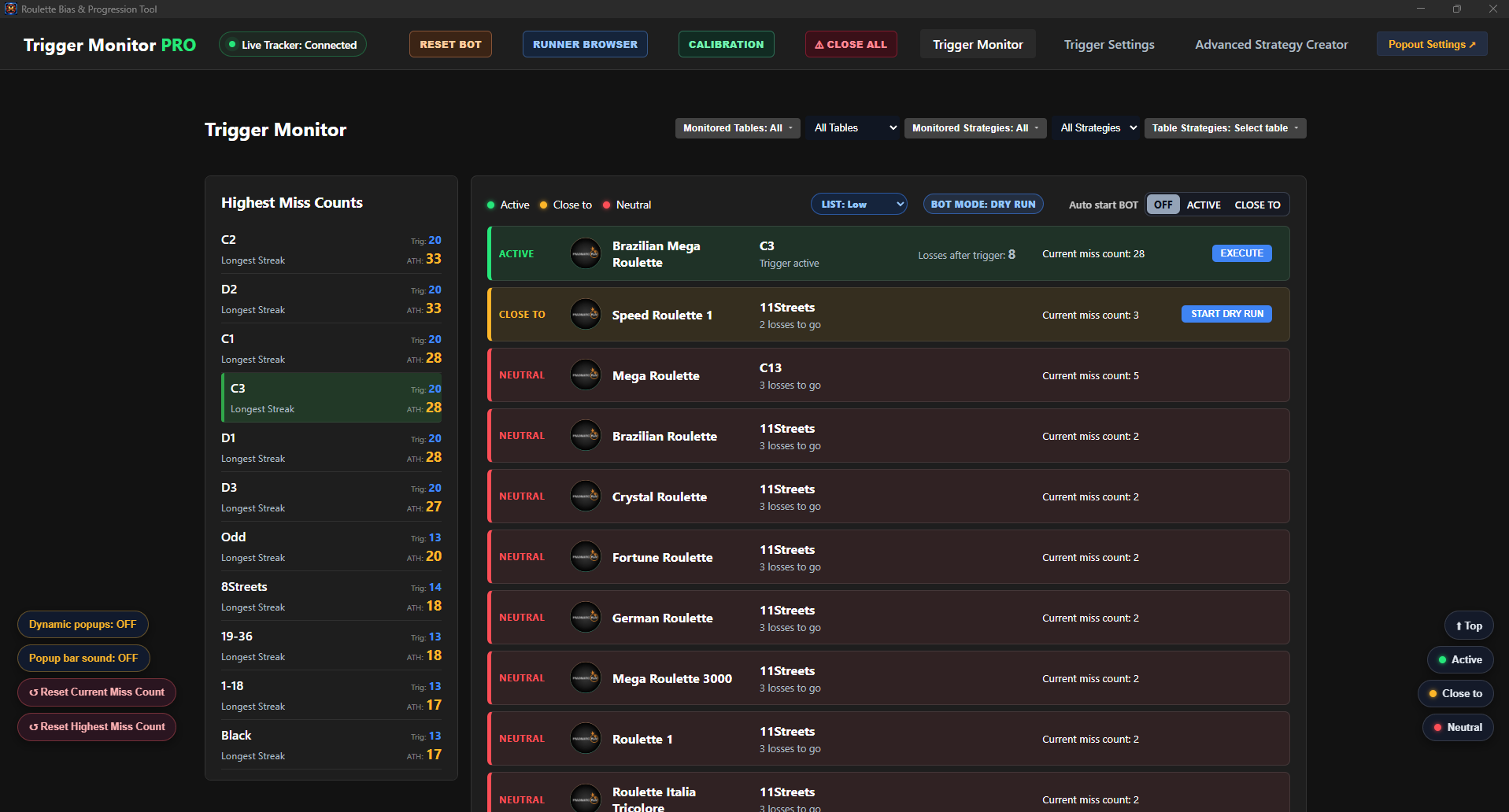
From a trigger to a placed strategy.
See when a strategy is CLOSE TO or ACTIVE, then use your chosen execution mode.
You set the strategy and stakes. The software does not predict winning numbers.
30+
ROULETTE TABLES MONITORED
15
DIRECT-URL AUTO BET TABLES
1 click
MANUAL EXECUTE
WHAT CAN TRIGGER TOOL DO?
Follow your roulette setup.
Spend less time placing each bet.
01 / MONITOR
Watch roulette tables and track triggers
Monitor multiple tables and follow the conditions you define for your strategies. CLOSE TO and ACTIVE statuses show where each trigger stands.
Track miss counts, all-time highs and strategy progression in one view.
02 / TRIGGER LISTS
The same triggers, different stakes
Create separate lists for different setups. Copy a list and scale its stakes — for example, from $0.10 to $1 or $10 — without editing every trigger by hand.
Select the active list in Monitor. Rename, edit or delete lists as needed.
03 / RUNNER
Let Runner place your strategy
Runner uses saved chip and betting-position calibration to place the configured layout, including strategies with multiple streets.
It processes results and configured progression. Suitable continuation bets can use calibrated REBET and 2x controls.
TWO WAYS TO EXECUTE
Automatic starts or a click from you.
AUTO BET · 15 DIRECT-URL TABLES
Let the trigger start the run
Enable Auto Start ACTIVE or CLOSE TO for supported direct-URL tables. Runner opens the relevant table and places the configured strategy when the trigger qualifies.
MANUAL EXECUTE · CALIBRATED TABLES
Choose the table yourself
Open Runner Browser, choose the table through the lobby and enter its betting board. Click Execute on the matching CLOSE TO or ACTIVE trigger. Runner automatically uses that table’s calibration.
These tables never start through Auto Start. Your manual browser stays open after a completed strategy; Auto Bet uses a separate window.
Runner handles one strategy at a time. A new run is blocked while it is executing or waiting for a result. Choose Dry Run to check the plan, or Live Betting to send real mouse clicks.
A PRACTICAL EXAMPLE
Your strategy needs 11 streets.
You have configured an 11-street strategy. Monitor shows its trigger as CLOSE TO or ACTIVE. Open the correct calibrated table and click Execute: Runner places the configured street bets using your selected list and stakes.
Trigger appears
You open the table
You click Execute
Runner places the strategy
After the result, Runner follows the strategy’s configured continuation or end condition. You decide the rules; the software carries out the plan.
Watch gameplay on Rumble ↗
HOW TO GET STARTED
Set up once. Then follow your triggers.
Choose your list
Create your triggers and bet progression, or select an existing trigger list.
Calibrate the table
Save chip positions, betting targets and the countdown timer. Copy an existing calibration as a starting point.
Check with Dry Run
Review the configured plan before enabling Live Betting.
Start your strategy
Use Auto Bet on direct-URL tables, or manually open a table and click Execute.
Monitor and Settings currently have separate list selections. Strategy export currently exports strategies only.
PRODUCT PREVIEW
See what you work with.
Build your roulette strategy
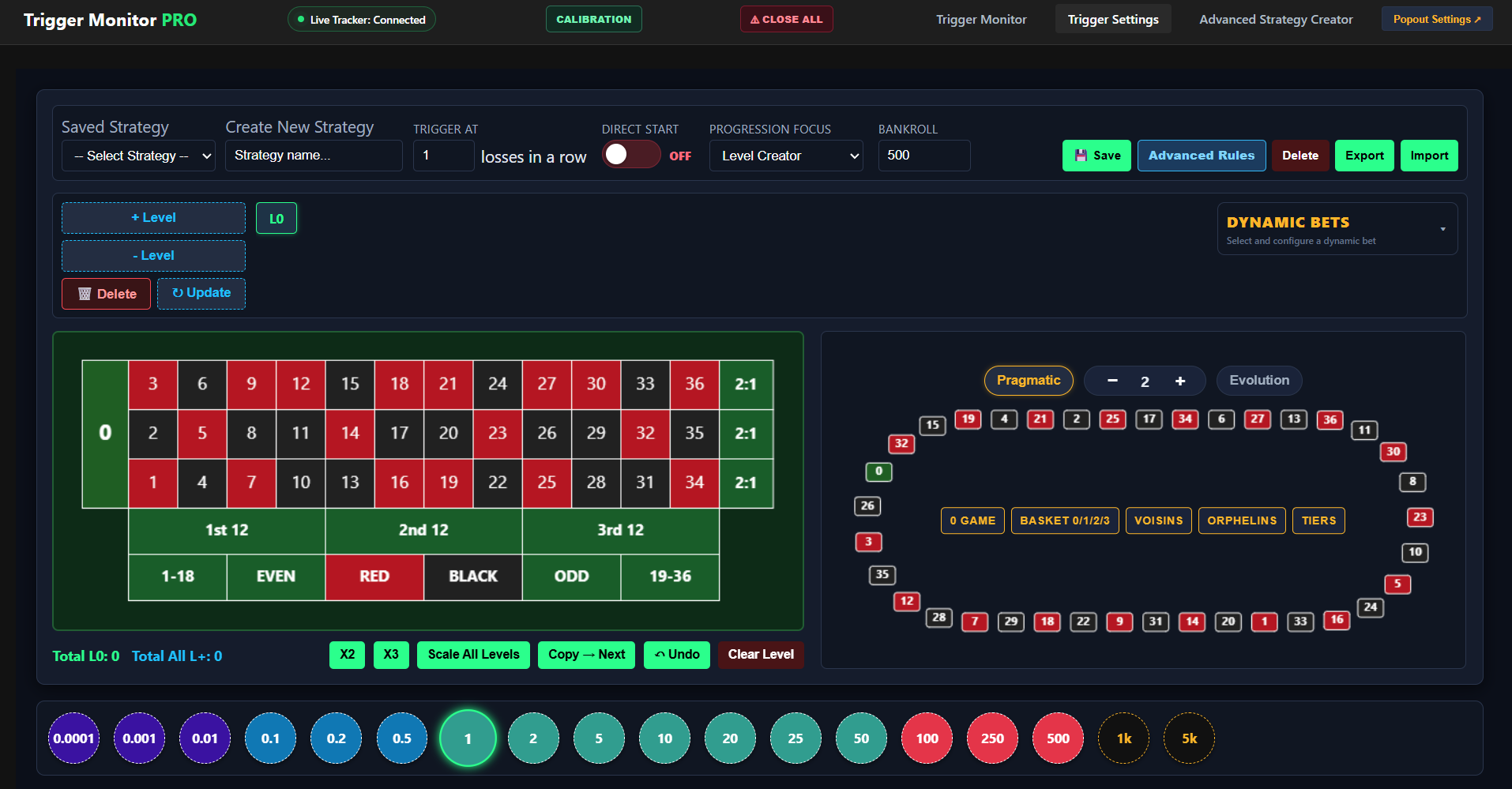
Define the layout and progression that Runner will execute.
Control the execution
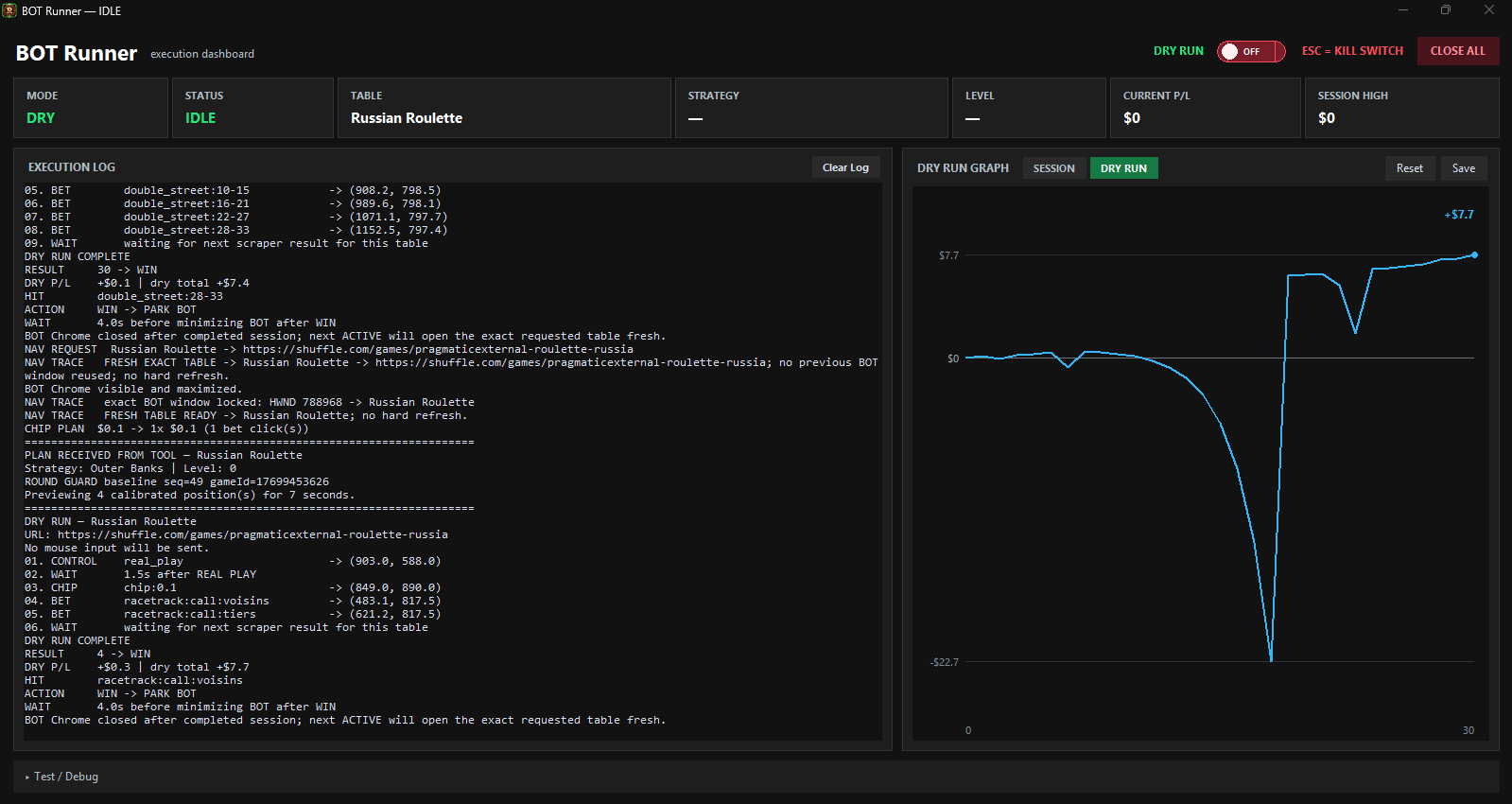
Review the plan and execution log in Runner.
Watch the Monitor for Triggers
Follow the CLOSE TO and ACTIVE statuses for your configured triggers.
Screenshots show existing tool screens. Video previews are provided by Rumble and require an internet connection. If a preview is blocked, use its direct video link.
TABLE SUPPORT
&
RESPONSIBLE USE
A tool for your workflow.
30+ roulette tables are monitored. 15 have direct URLs for Auto Bet; other monitored tables can use manual Execute after calibration. The two Privé Lounge tables are excluded.
Trigger Tool is independent roulette software. It is not a casino and does not hold funds or guarantee winnings. You remain responsible for your account, stakes and compliance with the third-party service’s rules. Gambling involves financial risk. Adults only.
PRICING
Choose your license duration.
New users receive 2 free trial days and 1 month free code claimer provided by Rayth.
FREQUENTLY ASKED QUESTIONS
Know what to expect.
What is Trigger Tool?
A Windows roulette application for monitoring table activity, tracking your triggers and executing bet layouts you configure yourself.
Where can i use Trigger Tool?
The Tool is set for shuffle.com and Stake.com Pragmatic tables.
How do i pay for Trigger Tool?
After installing the Tool, you need to send me a message on Discord or by email, then you send me a tip (regarding your wanted subscription) on shuffle.com and i will give you a serial to activate the Tool.
Does it predict roulette results or guarantee profit?
No. It follows your configured rules and does not predict winning numbers or guarantee any outcome. Gambling involves financial risk.
What is the difference between Auto Bet and Execute?
Auto Bet can start automatically on the 15 tables with direct URLs. Execute is for a calibrated table you open yourself through Runner Browser and always requires your click.
Will Auto Start run a manual Execute trigger?
No. Auto Start ACTIVE and CLOSE TO only apply to direct-URL tables. Tables without a direct URL require manual Execute.
Can multiple strategies run at the same time?
No. Runner accepts one strategy at a time. It blocks a new start while executing, waiting for a result or opening the browser.
Will my manually opened table close after a win?
No. The manual browser stays open after a completed strategy. A subsequent Auto Bet uses a separate window.
Can I keep different lists for different stakes?
Yes. Create or copy trigger lists, scale their stakes and select the active list in Monitor. ATH is shared for strategies with the same name. Monitor and Settings currently have separate list selections; exports currently contain strategies only.
Do I need to calibrate every table?
You need a saved calibration for the table you execute on. You can copy another calibration, including timer recognition, and check the positions. Manually opened tables do not require Real Play calibration.
Does Dry Run place real bets?
No. Enable Live Betting when you want Runner to send real mouse clicks. Review your configuration in Dry Run first.
Which platforms are supported, and is there a trial?
Trigger Tool is Windows only. New users receive 2 free trial days and 1 month free code claimer provided by Rayth. Paid access is activated with an Admin License key.
Is Trigger Tool affiliated with a casino?
No. It is independent software and does not hold player funds or provide casino accounts. You remain responsible for your use of third-party services.
How can I contact you?
Visit our
contact page
for email and the Discord community.